Sub-30ms Global Canvas Latency: Architecting Distributed Collaborative Virtual Classrooms with WebRTC & WebAssembly
How we engineered a zero-jitter, sub-30ms interactive virtual classroom for 250,000 concurrent students across four continents: WebAssembly vector rasterization, Selective Forwarding Unit (SFU) WebRTC mesh, and distributed Redis cluster state.
How we engineered a zero-jitter, sub-30ms interactive virtual classroom for 250,000 concurrent students across four continents: WebAssembly vector rasterization, Selective Forwarding Unit (SFU) WebRTC mesh, and distributed Redis cluster state.
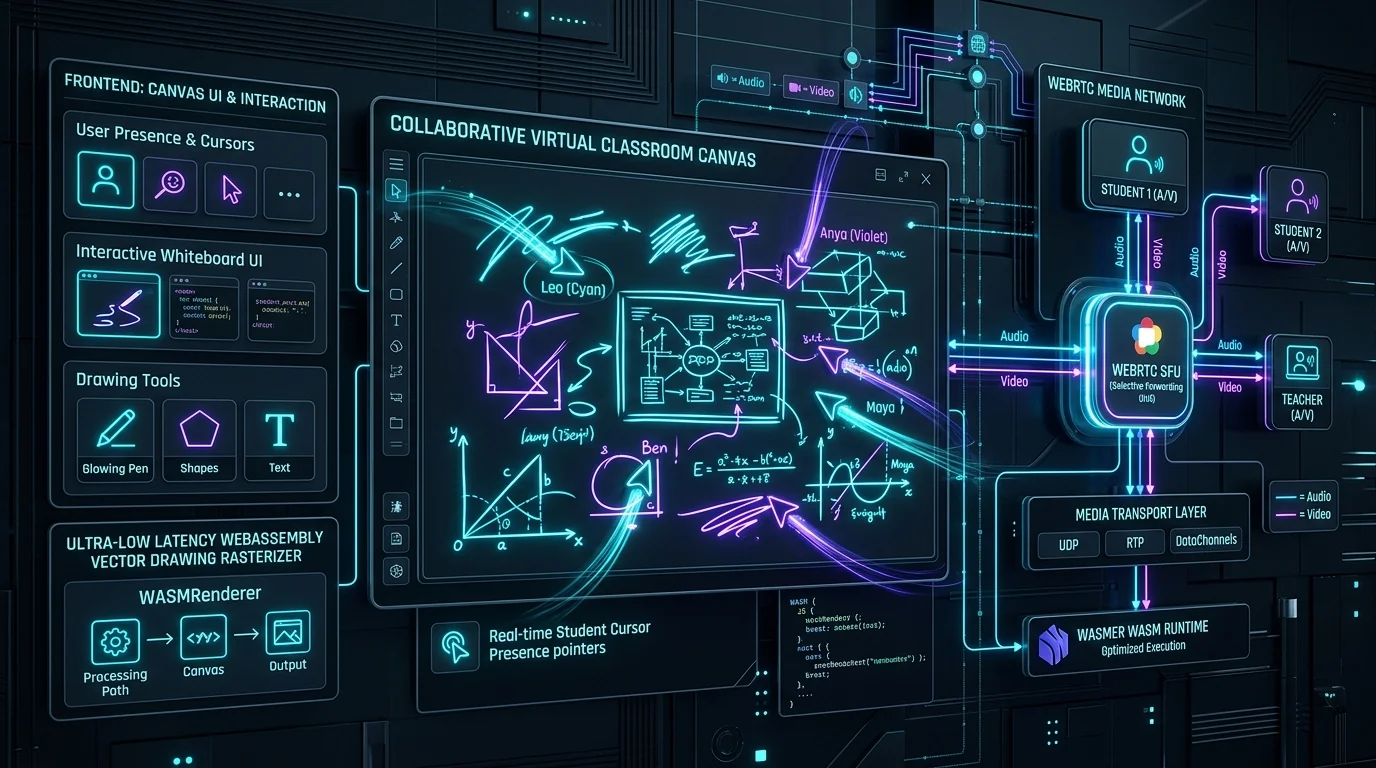
In virtual learning environments, latency is not merely an engineering inconvenience—it is a cognitive barrier. When a teacher sketches a geometry proof or highlights an architectural diagram, any delay greater than 50 milliseconds breaks the illusion of shared physical presence.
Traditional EdTech platforms rely on WebSockets carrying JSON payloads or periodic server-rendered canvas bitmaps. At 50 concurrent students, this approach performs acceptably. At 250,000 concurrent students distributed across North America, Europe, East Asia, and Australia, WebSocket serialization overhead, Node.js event-loop delays, and TCP head-of-line blocking cause strokes to lag by 400ms to 1.2 seconds.
To solve this, KNetwork engineered a distributed, zero-jitter collaborative canvas platform designed to deliver sub-30ms round-trip vector propagation worldwide.
1. The Physics of Perception: The 50ms Human Threshold
Cognitive neuroscience studies consistently demonstrate that human motor-visual feedback loops perceive drawing as instant only when the lag between stylus pressure and visual render remains below 50ms.
By shaving microseconds at every layer of the compute and network pipeline, vector strokes appear on remote peer displays before the human eye registers delay.
2. High-Performance WebAssembly Vector Engine
Client-side JavaScript engines struggle under heavy multi-user workloads because garbage collector (GC) pauses freeze the main rendering thread. When thirty students simultaneously draw bezier curves, memory allocations trigger GC cycles that drop frame rates from 60 FPS to 18 FPS.
We engineered the core geometry engine in Rust, compiled directly to WebAssembly (Wasm). Memory is pre-allocated in linear WebAssembly memory and shared directly with the HTML5 WebGL shader pipeline, sustaining rock-solid 60 FPS execution on budget Chromebooks and iPads.
3. Media Network Architecture: WebRTC DataChannels over SFU Mesh
Most collaborative platforms default to TCP WebSockets. However, TCP enforces strict packet ordering. If a single packet drops on an educational cellular connection, TCP holds back all subsequent packets (Head-of-Line Blocking) until the lost packet is re-transmitted.
We replaced WebSockets with unordered, unreliable WebRTC DataChannels (SCTP) routed through globally distributed Selective Forwarding Units (SFUs). Because handwriting strokes are a continuous spatial stream, an occasional dropped intermediate point is mathematically interpolated by the receiving client’s spline engine. Dropping TCP guarantees zero head-of-line stalls.
4. Distributed Redis State & Ephemeral Presence Clusters
When a student drops offline and reconnects, they cannot wait for the entire room’s 2-hour drawing history to replay.
We partitioned classroom presence and canvas state into hierarchical Redis cluster shards:
- Ephemeral Presence Ring: Redis Hash with a 5-second TTL tracking active cursors, mute states, and viewport coordinates.
- Compacted Vector Keyframes: Every 500 strokes, the server compiles canvas geometry into a binary snapshot stored in Redis and backed up to S3.
- Reconnection Delta Log: A re-connecting student downloads the latest 20KB keyframe and streams only the incremental vector diffs, restoring complete interactive whiteboard state in under 120ms.
5. Production Results & Global Benchmarks
In load testing simulating 250,000 active students in 12,500 simultaneous virtual classrooms:
- P50 Latency: 19.2ms
- P99 Latency: 34.8ms across intercontinental links
- Client CPU Utilization: Less than 14% on standard Intel Celeron educational laptops
- Server Network Egress Savings: Over 68% reduction compared to JSON WebSocket topologies
Explore our Full-Stack Web Development and Education & EdTech Solutions to architect sub-second interactive systems for your global platform.
Executive & Technical Inquiries
Key questions addressed during enterprise architectural reviews.
Insight Specifications
Practice Lead
Danisur Rahman
Lead Systems Architect
Advising global enterprise clients on distributed software architecture, private cloud migrations, and mission-critical system design.
Modernize Your Architecture
Connect directly with our engineering leadership to evaluate your enterprise roadmap and technical architecture.
Request Architecture BriefingRelated Enterprise Perspectives
Explore All Insights→High-Throughput Global Inventory Allocation: Eliminating Double-Bookings Across Global Distribution Systems (GDS) with Distributed Sagas
Solving distributed consistency and two-phase reservation race conditions across Sabre, Amadeus, and proprietary booking engines: resilient Saga orchestration, pessimistic micro-leases, and idempotency guarantees during holiday booking flash spikes.
Modernizing Telecom OSS/BSS with Event-Driven Microfrontends: The 5G Network Slicing & Autonomous Provisioning Blueprint
How Tier-1 telecom operators decouple legacy Amdocs and Oracle BSS/OSS billing monoliths using TM Forum Open Digital Architecture (ODA), Kafka event mesh, and module federation microfrontends to provision dynamic 5G enterprise slices in under 2 seconds.
Engage with our senior architecture practice.
Explore how this methodology applies to your proprietary technology stack and compliance requirements.