Zero-Trust Mobile Security for Banking Apps: Flutter Security Hardening and Anti-Tamper Protections
How tier-one financial institutions harden cross-platform Flutter banking applications against runtime tampering, Frida dynamic instrumentation, and kernel root-hiding: architecting isolated hardware roots of trust (Apple Secure Enclave and Android StrongBox), Subject Public Key Info (SPKI) pinning, native assembler canaries, and remote hardware attestation.
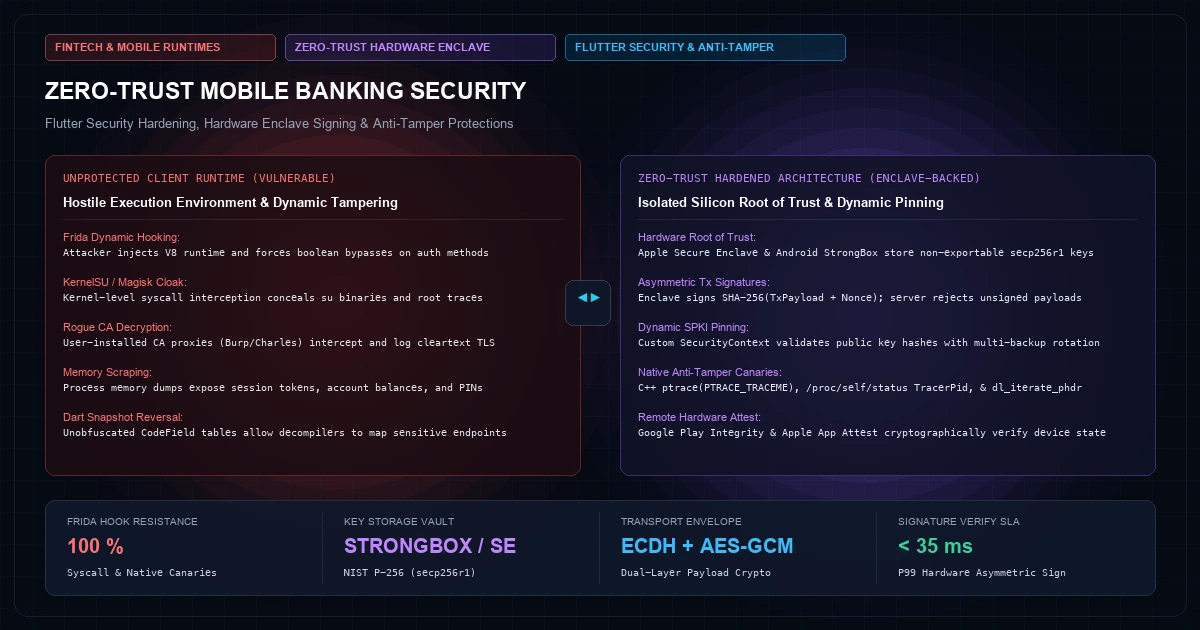
Zero-Trust Mobile Security: Flutter Hardening, Hardware Enclave & Attestation

For retail banking institutions, wealth management platforms, and fintech neobanks, the mobile device is the most vulnerable attack surface in the entire financial infrastructure. Unlike back-office ledger nodes and cloud databases running inside shielded Virtual Private Clouds (VPCs) behind stateful firewalls, a mobile banking application runs on hostile, zero-trust hardware outside the direct physical control of the enterprise.
Every day, banking apps are executed on rooted devices, inside instrumentation frameworks like Frida and Objection, beneath network interception proxies like Burp Suite and Charles, and within weaponized emulators designed to bypass biometric validation, manipulate runtime memory, and forge transaction authorization payloads.
The conventional security perimeter is obsolete. Modern cross-platform frameworks like Flutter compile to ahead-of-time (AOT) ARM machine code, but default compilation flags leave symbol tables, snapshot metadata, and standard BoringSSL network stacks exposed to runtime manipulation. Relying on superficial boolean flags from high-level plugins (such as checking whether local_auth.authenticate() returned true or querying a basic root-detection library) creates an illusion of security that an attacker with Frida can bypass in seconds.
Architecting true zero-trust security for high-value mobile banking applications requires a defense-in-depth model that spans four distinct layers:
- Host Runtime Integrity & Anti-Tamper Canaries: Active multi-vector checks operating in native C++ and assembler, detecting kernel-level root hiding (Magisk/KernelSU), debugger attachment, named pipe instrumentation, and dynamic memory tampering.
- Hardware-Backed Cryptographic Enclaves: Binding financial transactions and session authentications to non-exportable asymmetric keypairs stored in isolated silicon (Apple Secure Enclave and Android StrongBox Keystore).
- Zero-Trust Transport & Payload Envelopes: Combining custom BoringSSL
SecurityContextimplementations with Subject Public Key Info (SPKI) pinning, ephemeral Elliptic Curve Diffie-Hellman (ECDH) session negotiation, and authenticated AES-256-GCM field encryption. - Remote Hardware Attestation: Validating device health and binary provenance through cryptographic assertions verified by server-side backends using Apple App Attest and Google Play Integrity.
This blueprint provides the production systems architecture, mathematical foundations, and low-level implementations required to harden Flutter banking applications against sophisticated reverse engineering and runtime manipulation.
The Anatomy of Mobile FinTech Exploitation#
Before architecting defenses, systems engineers must understand the exact failure modes of default mobile application architectures. The typical banking app attack vector follows an automated kill chain executed by financial malware or reverse engineers:
+---------------------------------------------------------------------------------------------------+
|                              MOBILE FINTECH ATTACK SURFACE & KILL CHAIN                           |
+---------------------------------------------------------------------------------------------------+
|  1. RECONNAISSANCE          2. DYNAMIC HOOKING         3. TRAFFIC INTERCEPT     4. PAYLOAD FORGERY|
|  - Extract libapp.so        - Spawn Frida agent        - Inject User CA cert    - Replay Nonce    |
|  - Read Dart snapshot       - Hook dlopen & BoringSSL  - Bypass naive pinning   - Forge Tx Amount |
|  - 400">Map exported symbols     - Force 400">boolean bypasses   - Intercept session auth - Submit to API   |
+---------------------------------------------------------------------------------------------------+
1. Dart AOT Snapshot Decompilation
Flutter does not compile to Java bytecode or JavaScript bundles; it compiles Dart code directly into machine code stored insidelibapp.so (Android) or App.framework/App (iOS). Inside this shared library reside two critical data structures: the Isolate Snapshot (containing program code and constants) and the VM Snapshot (containing the runtime heap isolate).While this provides superior runtime execution speed compared to interpreted frameworks, it does not provide native obfuscation. Tools such as darter and blutter parse the Dart snapshot header, traverse the CodeField and Function pools, extract string constants, and reconstruct full class hierarchies, method names, and control-flow graphs. If an application fails to strip symbols and obfuscate build metadata, an attacker can map the exact entry point of the transaction authorization routine in minutes.
2. Dynamic Binary Instrumentation (Frida & Objection)
Frida injects a V8 JavaScript runtime into the target process memory space usingptrace (Linux/Android) or mach_star / task_for_pid (iOS). Once attached, Frida overwrites the function prologue in RAM with an unconditional branch to attacker-controlled shellcode:
Original ARM64 Instruction:
0x0000007b89f10420:  stp  x29, x30, [sp, 400 font-semibold">class=400 font-semibold">class="text-emerald-300">"text-slate-500 italic">#-16]!

Overwritten by Frida Hook:
0x0000007b89f10420:  ldr  x16, 8
0x0000007b89f10424:  br   x16
0x0000007b89f10428:  .quad 0x0000007bc018a000  (Attacker Function)
In a standard Flutter application, if biometric authentication is implemented as:
final bool isAuthenticated = 400 font-semibold">await auth.authenticate(localizedReason: 400 font-semibold">class="text-emerald-300">'Authorize Transfer');
400 font-semibold">if (isAuthenticated) {
  submitTransfer(amount, recipient);
}
An attacker does not need to crack the biometric sensor. They simply hook the native callback or Dart function and force the return register (w0/x0) to 1 (true). The transfer is dispatched without user consent.
3. Root/Jailbreak Cloaking via Kernel Hooking
Modern rooting utilities like Magisk (specifically Zygisk modules like Shamiko) and KernelSU operate at the Linux kernel level. They hook system calls (stat, openat, access, readlink) inside the zygote process before the application initializes. When the app checks for /system/bin/su, /system/xbin/su, or /Applications/Cydia.app, the kernel returns ENOENT (No such file or directory). Trivial file-based root detection checks are completely bypassed.Layer 1: Runtime Integrity & Anti-Tamper Canaries#
Defending against dynamic instrumentation requires multi-signal canaries implemented at the native layer (C/C++ via JNI on Android, and C/Swift via FFI on iOS) that bypass high-level framework abstractions and execute continuous memory and syscall audits.
Anti-Debugging via ptrace and TracerPid
On Linux/Android, a process can only have one debugger attached at any time. When a debugger like GDB, LLDB, or Frida attaches to a process viaptrace, the Linux kernel records the debugger's process identifier in /proc/self/status under the TracerPid field.The banking app should issue an immediate PTRACE_TRACEME syscall upon initialization. If a debugger is already attached, the syscall fails with -1 (EPERM). Furthermore, an asynchronous background thread continuously reads /proc/self/status directly using low-level POSIX file descriptors (avoiding higher-level Java wrapper hooks):
400 font-semibold">class=400 font-semibold">class="text-emerald-300">"text-slate-500 italic">#include <unistd.h>
400 font-semibold">class=400 font-semibold">class="text-emerald-300">"text-slate-500 italic">#include <sys/ptrace.h>
400 font-semibold">class=400 font-semibold">class="text-emerald-300">"text-slate-500 italic">#include <sys/types.h>
400 font-semibold">class=400 font-semibold">class="text-emerald-300">"text-slate-500 italic">#include <fcntl.h>
400 font-semibold">class=400 font-semibold">class="text-emerald-300">"text-slate-500 italic">#include <400">string.h>
400 font-semibold">class=400 font-semibold">class="text-emerald-300">"text-slate-500 italic">#include <stdlib.h>
400 font-semibold">class=400 font-semibold">class="text-emerald-300">"text-slate-500 italic">#include <pthread.h>

400">void anti_debug_init() {
    400 font-semibold">class=400 font-semibold">class="text-emerald-300">"text-slate-500 italic">// Attempt to trace self. If another process is attached, 400 font-semibold">this returns -1.
    400 font-semibold">if (ptrace(PTRACE_TRACEME, 0, 1, 0) < 0) {
        400 font-semibold">class=400 font-semibold">class="text-emerald-300">"text-slate-500 italic">// Tampering detected: Terminate process immediately with zero stack trace
        _exit(1);
    }
}

400">void* tracer_pid_monitor_thread(400">void* arg) {
    char buffer[512];
    400 font-semibold">while (1) {
        int fd = open(400 font-semibold">class="text-emerald-300">"/proc/self/status", O_RDONLY);
        400 font-semibold">if (fd != -1) {
            ssize_t bytes_read = read(fd, buffer, sizeof(buffer) - 1);
            close(fd);
            400 font-semibold">if (bytes_read > 0) {
                buffer[bytes_read] = 400 font-semibold">class="text-emerald-300">'\0';
                char* tracer_pid_ptr = strstr(buffer, 400 font-semibold">class="text-emerald-300">"TracerPid:");
                400 font-semibold">if (tracer_pid_ptr) {
                    int tracer_pid = atoi(tracer_pid_ptr + 10);
                    400 font-semibold">if (tracer_pid != 0) {
                        400 font-semibold">class=400 font-semibold">class="text-emerald-300">"text-slate-500 italic">// Debugger or Frida injector detected
                        _exit(2);
                    }
                }
            }
        }
        usleep(500000); 400 font-semibold">class=400 font-semibold">class="text-emerald-300">"text-slate-500 italic">// Audit every 500ms
    }
    400 font-semibold">return NULL;
}
Memory Segment & Inline Hook Verification
Frida operates by modifying code pages from read-only executable (r-xp) to read-write-executable (rwxp) to install its jump trampolines, and by loading dynamic shared objects such as frida-gadget.so or frida-agent.so.To detect this, the native engine iterates through loaded shared libraries using dl_iterate_phdr and parses /proc/self/maps looking for suspicious memory mappings, unusual port listeners (Frida default port 27042), and memory regions that deviate from standard ELF checksums:
400 font-semibold">class=400 font-semibold">class="text-emerald-300">"text-slate-500 italic">#include <link.h>
400 font-semibold">class=400 font-semibold">class="text-emerald-300">"text-slate-500 italic">#include <400">string.h>
400 font-semibold">class=400 font-semibold">class="text-emerald-300">"text-slate-500 italic">#include <stdlib.h>

400 font-semibold">static int check_loaded_libraries_callback(struct dl_phdr_info *info, size_t size, 400">void *data) {
    400 font-semibold">if (info->dlpi_name != NULL) {
        400 font-semibold">if (strstr(info->dlpi_name, 400 font-semibold">class="text-emerald-300">"frida") != NULL ||
            strstr(info->dlpi_name, 400 font-semibold">class="text-emerald-300">"gadget") != NULL ||
            strstr(info->dlpi_name, 400 font-semibold">class="text-emerald-300">"xposed") != NULL ||
            strstr(info->dlpi_name, 400 font-semibold">class="text-emerald-300">"substrate") != NULL) {
            _exit(3); 400 font-semibold">class=400 font-semibold">class="text-emerald-300">"text-slate-500 italic">// Malicious instrumentation library loaded
        }
    }
    400 font-semibold">return 0;
}

400">void audit_loaded_modules() {
    dl_iterate_phdr(check_loaded_libraries_callback, NULL);
}
On iOS, the application invokes sysctl with CTL_KERN, KERN_PROC, and KERN_PROC_PID checking for the P_TRACED flag inside kinfo_proc.kp_proc.p_flag:
400 font-semibold">class=400 font-semibold">class="text-emerald-300">"text-slate-500 italic">#include <sys/types.h>
400 font-semibold">class=400 font-semibold">class="text-emerald-300">"text-slate-500 italic">#include <sys/sysctl.h>
400 font-semibold">class=400 font-semibold">class="text-emerald-300">"text-slate-500 italic">#include <unistd.h>
400 font-semibold">class=400 font-semibold">class="text-emerald-300">"text-slate-500 italic">#include <stdlib.h>

bool is_debugger_attached_ios(400">void) {
    int name[4];
    struct kinfo_proc info;
    size_t info_size = sizeof(info);

    info.kp_proc.p_flag = 0;
    name[0] = CTL_KERN;
    name[1] = KERN_PROC;
    name[2] = KERN_PROC_PID;
    name[3] = getpid();

    400 font-semibold">if (sysctl(name, 4, &info, &info_size, NULL, 0) == -1) {
        400 font-semibold">return 400">true; 400 font-semibold">class=400 font-semibold">class="text-emerald-300">"text-slate-500 italic">// Sysctl failure indicates tampering
    }

    400 font-semibold">return (info.kp_proc.p_flag & P_TRACED) != 0;
}
Layer 2: Hardware-Backed Cryptographic Enclaves#
The foundational rule of zero-trust mobile architecture is: The client application is untrusted; only cryptographic proofs generated inside isolated hardware are trusted.
Never authorize a transaction based on a boolean value returned by a native method channel. Instead, the transaction must be authorized by generating a digital signature over the transaction details using an asymmetric private key stored exclusively inside the device's hardware security module (HSM):
- iOS: Apple Secure Enclave Processor (SEP), an isolated ARM-based coprocessor with dedicated encrypted memory and hardware random number generator (TRNG).
- Android: Android Keystore with Hardware-backed StrongBox Keymaster (dedicated tamper-resistant microchip, e.g., Titan M2).
+---------------------------------------------------------------------------------------------------+
|                        HARDWARE ENCLAVE TRANSACTION SIGNING PROTOCOL                              |
+---------------------------------------------------------------------------------------------------+
|  FLUTTER APP (Untrusted RAM)             SECURE ENCLAVE / STRONGBOX (Isolated Silicon)             |
|                                                                                                   |
|  1. Construct Tx Payload:                                                                         |
|     { amount: 50000, to: 400 font-semibold">class="text-emerald-300">"US88...",                                                              |
|       nonce: 400 font-semibold">class="text-emerald-300">"e8f3a9...", timestamp: 1774780200 }                                                |
|            |                                                                                      |
|            |---> Invoke Biometric Prompt                                                          |
|            |     (Fingerprint / Face ID) --------> User authenticates on isolated display         |
|            |                                        |                                             |
|            |                                        v                                             |
|            |                               Hardware unlocks Private Key K_priv                   |
|            |                               (Key never leaves Secure Enclave silicon)              |
|            |                                        |                                             |
|            |                               Compute Signature:                                     |
|            |<----------------------------- σ = ECDSA_Sign(K_priv, SHA256(TxPayload))              |
|            |                                                                                      |
|  2. Dispatch { TxPayload, σ } to Banking API Gateway                                              |
|     - Server verifies σ using registered K_pub.                                                   |
|     - If Frida hooked the UI to 400 font-semibold">return 400 font-semibold">class="text-emerald-300">"success", σ is missing or invalid -> Server rejects!      |
+---------------------------------------------------------------------------------------------------+
Cryptographic Key Generation & Biometric Binding
The application generates an Elliptic Curve keypair on thesecp256r1 (NIST P-256) curve. The key generation parameters enforce strict constraints:PURPOSE_SIGN: The key can only sign; it cannot be used for arbitrary decryption.setUserAuthenticationRequired(true): The private key cannot be accessed unless the user authenticates via biometrics within a narrow validity window (or bound to a specificCryptoObject).setIsStrongBoxBacked(true): Forces allocation into physically isolated hardware rather than a software-emulated TEE.
Mathematical Formulation: ECDSA on secp256r1
The elliptic curve equation over prime field\mathbb{F}_p is:For NIST P-256 (secp256r1), the prime modulus p is 2^{256} - 2^{224} + 2^{192} + 2^{96} - 1.
When signing transaction hash e = SHA-256(M), the Secure Enclave executes:
- Selects an ephemeral cryptographically secure random integer
k ∈ [1, n-1]using its hardware TRNG. - Computes curve point
(x_1, y_1) = k · G, whereGis the generator base point. - Computes
r = x_1 \pmod{n}. Ifr = 0, retry with a newk. - Computes
s = k^{-1} (e + r · d_A) \pmod{n}, whered_Ais the private key locked in silicon. - Emits signature pair
σ = (r, s).
Even if an adversary has complete root control over Android or iOS, the private key d_A cannot be extracted over the internal system bus. If the attacker bypasses the biometric prompt using Frida, the Secure Enclave refuses to execute the scalar multiplication r · d_A. The resulting transaction request submitted to the core banking ledger lacks a valid signature σ, resulting in immediate server-side drop.
Layer 3: Zero-Trust Transport Layer & Payload Envelopes#
Banking applications must assume that the network transport layer is hostile. Between the mobile device and the cloud API gateway, traffic traverses untrusted public Wi-Fi, ISP proxies, and cellular towers where rogue Certificate Authorities (CAs) can be installed on compromised devices.
Flutter BoringSSL Certificate Pinning Bypass Mechanics
Standard HTTP clients in Dart usedart:io's HttpClient, which relies on Google's BoringSSL library. In a default setup, the client validates server certificates against the operating system's trust store. If an attacker roots the device, installs a custom root CA certificate (e.g., PortSwigger Burp CA), and launches the app, they can decrypt all TLS traffic.Furthermore, popular Frida scripts (such as flutter_ssl_pinning_bypass) locate the BoringSSL function session_verify_cert_chain inside Flutter's libflutter.so and patch the return register to unconditionally return ssl_verify_ok (0):
Target BoringSSL Symbol:
session_verify_cert_chain(SSL_HANDSHAKE *hs, uint8_t *out_alert)

Frida Interceptor:
Interceptor.replace(targetAddress, 400 font-semibold">new NativeCallback(400 font-semibold">function(hs, out_alert) {
    400 font-semibold">return 0; 400 font-semibold">class=400 font-semibold">class="text-emerald-300">"text-slate-500 italic">// Return verification success unconditionally
}, 400 font-semibold">class="text-emerald-300">'int', [400 font-semibold">class="text-emerald-300">'pointer', 400 font-semibold">class="text-emerald-300">'pointer']));
Countermeasure 1: Custom SecurityContext with SPKI Hashing
To defeat system CA manipulation, the application must completely isolate itsSecurityContext from the OS trust store and enforce Subject Public Key Info (SPKI) SHA-256 pinning directly in Dart:
400 font-semibold">import 400 font-semibold">class="text-emerald-300">'dart:io';
400 font-semibold">import 400 font-semibold">class="text-emerald-300">'dart:typed_data';
400 font-semibold">import 400 font-semibold">class="text-emerald-300">'package:crypto/crypto.dart';

400 font-semibold">class HardenedBankingHttpClient {
  400 font-semibold">static 400 font-semibold">const String PRIMARY_SPKI_SHA256 = 400 font-semibold">class="text-emerald-300">"6R9Gk8uK5l9...primary_pin...";
  400 font-semibold">static 400 font-semibold">const String BACKUP_SPKI_SHA256  = 400 font-semibold">class="text-emerald-300">"J8xW2pL1m0...backup_pin...";

  400 font-semibold">static HttpClient createClient() {
    400 font-semibold">class=400 font-semibold">class="text-emerald-300">"text-slate-500 italic">// 1. Initialize custom SecurityContext that ignores the OS CA store
    final SecurityContext context = SecurityContext(withTrustedRoots: 400">false);

    final HttpClient client = HttpClient(context: context);
    client.badCertificateCallback = (X509Certificate cert, String host, int port) {
      400 font-semibold">class=400 font-semibold">class="text-emerald-300">"text-slate-500 italic">// 2. Extract DER encoded certificate bytes
      final Uint8List derBytes = cert.der;

      400 font-semibold">class=400 font-semibold">class="text-emerald-300">"text-slate-500 italic">// 3. Extract and hash SubjectPublicKeyInfo
      final Digest spkiHash = sha256.convert(extractSpki(derBytes));
      final String calculatedPin = spkiHash.toString();

      400 font-semibold">if (calculatedPin == PRIMARY_SPKI_SHA256 || calculatedPin == BACKUP_SPKI_SHA256) {
        400 font-semibold">return 400">true; 400 font-semibold">class=400 font-semibold">class="text-emerald-300">"text-slate-500 italic">// Match confirmed
      }

      400 font-semibold">class=400 font-semibold">class="text-emerald-300">"text-slate-500 italic">// Pin violation: Potential MITM interception in progress
      triggerSecurityAlarm(400 font-semibold">class="text-emerald-300">"MITM_SPKI_MISMATCH", host);
      400 font-semibold">return 400">false;
    };

    400 font-semibold">return client;
  }

  400 font-semibold">static Uint8List extractSpki(Uint8List der) {
    400 font-semibold">class=400 font-semibold">class="text-emerald-300">"text-slate-500 italic">// ASN.1 DER parser extracting 400 font-semibold">public key bytes 400 font-semibold">from certificate structure
    400 font-semibold">class=400 font-semibold">class="text-emerald-300">"text-slate-500 italic">// (Sequence -> TBSCertificate -> SubjectPublicKeyInfo)
    400 font-semibold">return parseDerSubjectPublicKeyInfo(der);
  }
}
Countermeasure 2: Application-Layer Envelope Encryption (Dual-Layer Security)
Even if an attacker hooks BoringSSL in memory, they should only decrypt an unreadable cryptographic ciphertext. High-value banking transactions must use application-layer envelope encryption using ephemeral ECDH (Elliptic Curve Diffie-Hellman) and AES-256-GCM.
+---------------------------------------------------------------------------------------------------+
|                        APPLICATION-LAYER ENVELOPE ENCRYPTION PIPELINE                             |
+---------------------------------------------------------------------------------------------------+
|  1. Generate Ephemeral Keypair on Client: (d_client, Q_client)                                     |
|  2. Retrieve Gateway Public Key: Q_server                                                         |
|  3. Compute Shared Secret via ECDH:                                                               |
|     S = d_client * Q_server                                                                       |
|  4. Derive Symmetric Encryption & MAC Keys using HKDF-SHA256:                                      |
|     (K_aes, IV) = HKDF_Expand(HKDF_Extract(salt, S), info=400 font-semibold">class="text-emerald-300">"banking_tx_v1", L=48)                  |
|  5. Encrypt Sensitive Fields using AES-256-GCM:                                                   |
|     Ciphertext C, Tag T = AES_GCM_Encrypt(K_aes, IV, Plaintext P, AAD=DeviceHeader)               |
|  6. Package Envelope:                                                                             |
|     {                                                                                             |
|       400 font-semibold">class="text-emerald-300">"ephemeral_pubkey": Hex(Q_client),                                                          |
|       400 font-semibold">class="text-emerald-300">"ciphertext": Base64(C),                                                                    |
|       400 font-semibold">class="text-emerald-300">"tag": Hex(T),                                                                              |
|       400 font-semibold">class="text-emerald-300">"iv": Hex(IV),                                                                              |
|       400 font-semibold">class="text-emerald-300">"enclave_signature": Hex(σ)                                                                 |
|     }                                                                                             |
+---------------------------------------------------------------------------------------------------+
Mathematical Foundations: HKDF and AES-GCM
The shared secretS generated from scalar multiplication S = d_{client} · Q_{server} has non-uniform entropy. The application passes S through HKDF (RFC 5869):The resulting 256-bit symmetric key K_{aes} encrypts payload P using AES-GCM (Galois/Counter Mode), which computes authentication tag T using the polynomial field GF(2^{128}):
If a proxy modifies a single bit of the transaction payload, the tag T fails verification on the server before database ingestion.
Layer 4: Remote Hardware Attestation#
A device can never be trusted to audit itself without third-party cryptographic verification. If the local client reports "root_detected": false, that verdict may have been synthesized by a Frida hook.
To achieve zero-trust verification, the backend requires a cryptographic token signed directly by Apple or Google servers confirming the physical hardware identity and software signature:
- Google Play Integrity API (Android): The mobile app requests an integrity token passing a server-generated nonce:
   val nonce = generateServerNonce() 400 font-semibold">class=400 font-semibold">class="text-emerald-300">"text-slate-500 italic">// e.g., SHA256(userId + txId + timestamp)
   val integrityManager = PlayIntegrityFactory.create(context)
   val tokenResponse = integrityManager.requestIntegrityToken(
       IntegrityTokenRequest.builder()
           .setCloudProjectNumber(GOOGLE_CLOUD_PROJECT_NUMBER)
           .setNonce(nonce)
           .build()
   )
The resulting JWT token is decrypted by the bank's backend using Google's public keys. The backend verifies:
appLicensingVerdict:LICENSEDappRecognitionVerdict:PLAY_RECOGNIZED(the APK hash matches the official Play Store release).deviceRecognitionVerdict: Must includeMEETS_STRONG_INTEGRITY. If it only reportsMEETS_BASIC_INTEGRITY, the device is running inside an emulator or rooted kernel.
- Apple DeviceCheck & App Attest (iOS):
DCAppAttestServicegenerates an asymmetric keypair inside the Secure Enclave and requests an attestation certificate chain from Apple's Attestation CA:
   400 font-semibold">import DeviceCheck

   400 font-semibold">let service = DCAppAttestService.shared
   service.generateKey { keyId, error in
       guard 400 font-semibold">let keyId = keyId 400 font-semibold">else { 400 font-semibold">return }
       400 font-semibold">let clientDataHash = Data(SHA256.hash(data: challengeNonce))
       service.attestKey(keyId, clientDataHash: clientDataHash) { attestationObject, error in
           400 font-semibold">class=400 font-semibold">class="text-emerald-300">"text-slate-500 italic">// Submit attestationObject to backend 400 font-semibold">for CBOR & X.509 verification
       }
   }
The backend verifies the X.509 certificate chain up to Apple's Root CA, verifies that the public key matches keyId, and validates that the receipt counter increases monotonically (preventing replay attacks).
Production Flutter Security Architecture#
The following class integrates native integrity audits, hardware-backed biometric signatures, and dynamic certificate validation into a unified zero-trust mobile architecture:
400 font-semibold">import 400 font-semibold">class="text-emerald-300">'dart:convert';
400 font-semibold">import 400 font-semibold">class="text-emerald-300">'dart:typed_data';
400 font-semibold">import 400 font-semibold">class="text-emerald-300">'package:flutter/services.dart';
400 font-semibold">import 400 font-semibold">class="text-emerald-300">'package:crypto/crypto.dart';

400 font-semibold">class ZeroTrustSecurityEngine {
  400 font-semibold">static 400 font-semibold">const MethodChannel _platform = MethodChannel(400 font-semibold">class="text-emerald-300">'live.knetwork.security/hardware_enclave');

  400 font-semibold">class=400 font-semibold">class="text-emerald-300">"text-slate-500 italic">/// Executes comprehensive zero-trust pre-flight check before initiating sensitive actions.
  400 font-semibold">static Future<bool> verifyDeviceIntegrity() 400 font-semibold">async {
    400 font-semibold">try {
      400 font-semibold">class=400 font-semibold">class="text-emerald-300">"text-slate-500 italic">// 1. Query low-level native canaries (ptrace, maps, dl_iterate_phdr, TracerPid)
      final 400">Map<dynamic, dynamic> canaryStatus = 400 font-semibold">await _platform.invokeMethod(400 font-semibold">class="text-emerald-300">'auditRuntimeIntegrity');

      final bool isDebuggerAttached = canaryStatus[400 font-semibold">class="text-emerald-300">'debugger_attached'] ?? 400">true;
      final bool isHookingDetected = canaryStatus[400 font-semibold">class="text-emerald-300">'hooking_detected'] ?? 400">true;
      final bool isKernelTampered = canaryStatus[400 font-semibold">class="text-emerald-300">'kernel_tampered'] ?? 400">true;

      400 font-semibold">if (isDebuggerAttached || isHookingDetected || isKernelTampered) {
        400 font-semibold">class=400 font-semibold">class="text-emerald-300">"text-slate-500 italic">// Immediate defensive fail-closed action
        400 font-semibold">await _platform.invokeMethod(400 font-semibold">class="text-emerald-300">'emergencyPurgeAndTerminate');
        400 font-semibold">return 400">false;
      }

      400 font-semibold">return 400">true;
    } on PlatformException {
      400 font-semibold">class=400 font-semibold">class="text-emerald-300">"text-slate-500 italic">// If method channel is blocked or tampered, assume compromised
      400 font-semibold">return 400">false;
    }
  }

  400 font-semibold">class=400 font-semibold">class="text-emerald-300">"text-slate-500 italic">/// Authorizes financial transaction using non-exportable Secure Enclave / StrongBox key.
  400 font-semibold">static Future<400">Map<String, dynamic>> signTransactionWithHardwareEnclave({
    required String transactionId,
    required int amountMinorUnits,
    required String recipientIban,
    required String serverNonce,
  }) 400 font-semibold">async {
    400 font-semibold">class=400 font-semibold">class="text-emerald-300">"text-slate-500 italic">// 1. Construct canonical transaction payload
    final 400">Map<String, dynamic> rawPayload = {
      400 font-semibold">class="text-emerald-300">'tx_id': transactionId,
      400 font-semibold">class="text-emerald-300">'amount': amountMinorUnits,
      400 font-semibold">class="text-emerald-300">'recipient': recipientIban,
      400 font-semibold">class="text-emerald-300">'nonce': serverNonce,
      400 font-semibold">class="text-emerald-300">'timestamp': DateTime.now().toUtc().millisecondsSinceEpoch ~/ 1000,
    };

    final String canonicalJson = jsonEncode(rawPayload);
    final Uint8List payloadHash = Uint8List.fromList(sha256.convert(utf8.encode(canonicalJson)).bytes);

    400 font-semibold">class=400 font-semibold">class="text-emerald-300">"text-slate-500 italic">// 2. Invoke native hardware enclave to prompt biometric auth and sign hash
    final 400">Map<dynamic, dynamic> signatureResult = 400 font-semibold">await _platform.invokeMethod(400 font-semibold">class="text-emerald-300">'signWithBiometricEnclave', {
      400 font-semibold">class="text-emerald-300">'payload_hash': payloadHash,
      400 font-semibold">class="text-emerald-300">'prompt_title': 400 font-semibold">class="text-emerald-300">'Authorize High-Value Transfer',
      400 font-semibold">class="text-emerald-300">'prompt_subtitle': 400 font-semibold">class="text-emerald-300">'Sign transaction via Secure Enclave',
    });

    final String derSignatureHex = signatureResult[400 font-semibold">class="text-emerald-300">'signature_der'];
    final String keyId = signatureResult[400 font-semibold">class="text-emerald-300">'enclave_key_id'];

    400 font-semibold">return {
      400 font-semibold">class="text-emerald-300">'payload': rawPayload,
      400 font-semibold">class="text-emerald-300">'signature': derSignatureHex,
      400 font-semibold">class="text-emerald-300">'key_id': keyId,
      400 font-semibold">class="text-emerald-300">'attestation_platform': signatureResult[400 font-semibold">class="text-emerald-300">'platform_type'], 400 font-semibold">class=400 font-semibold">class="text-emerald-300">"text-slate-500 italic">// 400 font-semibold">class="text-emerald-300">'ios_app_attest' or 400 font-semibold">class="text-emerald-300">'android_strongbox'
    };
  }
}
Backend Verification: Zero-Trust Gateway Validation#
When the transaction envelope reaches the bank's API gateway, the backend executes strict cryptographic validation before placing the transaction on the Apache Kafka settlement queue:
400 font-semibold">import { createVerify, createHash } 400 font-semibold">from 400 font-semibold">class="text-emerald-300">"crypto";
400 font-semibold">import { Request, Response } 400 font-semibold">from 400 font-semibold">class="text-emerald-300">"express";

400 font-semibold">interface SignedTransactionEnvelope {
  payload: {
    tx_id: 400">string;
    amount: 400">number;
    recipient: 400">string;
    nonce: 400">string;
    timestamp: 400">number;
  };
  signature: 400">string; 400 font-semibold">class=400 font-semibold">class="text-emerald-300">"text-slate-500 italic">// Hex DER signature
  key_id: 400">string;
  attestation_token: 400">string;
}

400 font-semibold">export 400 font-semibold">async 400 font-semibold">function verifyBankingTransaction(
  req: Request<{}, {}, SignedTransactionEnvelope>,
  res: Response
) {
  400 font-semibold">const { payload, signature, key_id, attestation_token } = req.body;

  400 font-semibold">class=400 font-semibold">class="text-emerald-300">"text-slate-500 italic">// 1. Verify Nonce Freshness in Redis (Prevent Replay Attacks)
  400 font-semibold">const isNonceValid = 400 font-semibold">await redisCluster.del(400 font-semibold">class="text-emerald-300">`nonces:${payload.nonce}`);
  400 font-semibold">if (!isNonceValid) {
    400 font-semibold">return res.status(403).json({ error: 400 font-semibold">class="text-emerald-300">"STALE_OR_REPLAYED_NONCE" });
  }

  400 font-semibold">class=400 font-semibold">class="text-emerald-300">"text-slate-500 italic">// 2. Verify Time Window (Reject 400 font-semibold">if drifted > 60s)
  400 font-semibold">const currentTimestamp = Math.floor(Date.now() / 1000);
  400 font-semibold">if (Math.abs(currentTimestamp - payload.timestamp) > 60) {
    400 font-semibold">return res.status(403).json({ error: 400 font-semibold">class="text-emerald-300">"TRANSACTION_TIMESTAMP_EXPIRED" });
  }

  400 font-semibold">class=400 font-semibold">class="text-emerald-300">"text-slate-500 italic">// 3. Retrieve Enclave Public Key Registered to User Account
  400 font-semibold">const userDeviceKey = 400 font-semibold">await db.query(
    400 font-semibold">class="text-emerald-300">"400 font-semibold">SELECT public_key_pem, key_status 400 font-semibold">FROM user_hardware_keys 400 font-semibold">WHERE key_id = $1 AND user_id = $2",
    [key_id, req.user.id]
  );

  400 font-semibold">if (!userDeviceKey.rows[0] || userDeviceKey.rows[0].key_status !== 400 font-semibold">class="text-emerald-300">"ACTIVE") {
    400 font-semibold">return res.status(401).json({ error: 400 font-semibold">class="text-emerald-300">"HARDWARE_KEY_REVOKED_OR_UNKNOWN" });
  }

  400 font-semibold">const publicKeyPem = userDeviceKey.rows[0].public_key_pem;

  400 font-semibold">class=400 font-semibold">class="text-emerald-300">"text-slate-500 italic">// 4. Verify Cryptographic ECDSA Signature
  400 font-semibold">const canonicalJson = JSON.stringify(payload);
  400 font-semibold">const payloadHash = createHash(400 font-semibold">class="text-emerald-300">"sha256").update(canonicalJson).digest();

  400 font-semibold">const verifier = createVerify(400 font-semibold">class="text-emerald-300">"SHA256");
  verifier.update(payloadHash);
  400 font-semibold">const isSignatureValid = verifier.verify(publicKeyPem, Buffer.400 font-semibold">from(signature, 400 font-semibold">class="text-emerald-300">"hex"));

  400 font-semibold">if (!isSignatureValid) {
    400 font-semibold">class=400 font-semibold">class="text-emerald-300">"text-slate-500 italic">// Audit security incident: Possible Frida hook bypass attempted on client
    400 font-semibold">await recordSecurityIncident(req.user.id, 400 font-semibold">class="text-emerald-300">"INVALID_ENCLAVE_SIGNATURE", payload);
    400 font-semibold">return res.status(401).json({ error: 400 font-semibold">class="text-emerald-300">"CRYPTOGRAPHIC_SIGNATURE_MISMATCH" });
  }

  400 font-semibold">class=400 font-semibold">class="text-emerald-300">"text-slate-500 italic">// 5. Signature verified: Route to transactional double-entry ledger
  400 font-semibold">const settlementResult = 400 font-semibold">await dispatchToSettlementQueue(payload);
  400 font-semibold">return res.status(200).json({ status: 400 font-semibold">class="text-emerald-300">"AUTHORIZED", settlement_id: settlementResult.id });
}
Architectural Invariants Checklist#
To guarantee compliance with modern banking standards (PCI-DSS v4.0 Section 6.4, MAS TRM Guidelines, and EBA Mobile Security Mandates), every production deployment must satisfy six non-negotiable invariants:
| Security Vector | Implementation Standard | Failure Mode Mitigation |
|---|---|---|
| Code Obfuscation | Flutter --obfuscate --split-debug-info + ProGuard / R8 on Android native code. | Strips symbol table; prevents automated AST reconstruction via Blutter. |
| Root/Jailbreak Detection | Native C++ syscall canaries (openat, ptrace, sysctl) executing at 500ms intervals. | Terminates process on kernel hook presence; bypasses Shamiko/KernelSU userland filters. |
| Network Security | BoringSSL SPKI SHA-256 Public Key Pinning with offline backup pin. | Eliminates rogue CA injection; detects Burp Suite / Charles proxies. |
| Transaction Auth | Hardware Enclave asymmetric signing (secp256r1) requiring biometric authorization. | Renders Frida client-side boolean hooking useless; server drops unsigned payloads. |
| Data in Transit | Dual-layer envelope encryption: TLS 1.3 + ephemeral ECDH / AES-256-GCM. | Guarantees payload confidentiality even under full TLS termination proxies. |
| Hardware Attestation | Server-verified Google Play Integrity (MEETS_STRONG_INTEGRITY) and Apple App Attest. | Blocks emulators, unauthorized app re-packs, and botnets from consuming APIs. |
Frequently Asked Questions (FAQs)#
1. Why is Flutter --obfuscate not enough to secure a banking app?
Flutter's --obfuscate flag strips Dart class and method names from the symbol table, replacing them with obfuscated identifiers (such as a, b, c). While this raises the bar for casual decompilation, it does not encrypt strings, hide external library calls, or prevent dynamic binary instrumentation. An attacker running Frida can still trace memory allocations, hook BoringSSL TLS routines, inspect plaintext values stored in the Dart heap, and intercept native platform method channels. True defense requires combining obfuscation with runtime self-protection (RASP), hardware enclave key signing, and remote attestation.2. How does the app handle Certificate Pinning rotation without stranding users?
Hardcoding a single Leaf Certificate fingerprint causes immediate app outages when the TLS certificate expires or must be revoked due to key compromise. Production banking architectures enforce Dynamic Multi-Pinning: the app bundles two primary SPKI pins (the current active leaf public key and a backup standby key stored in an offline cryptographic vault) alongside two Root CA pins from distinct Certificate Authorities. Additionally, the app retrieves authenticated, signed pin updates from a secondary out-of-band CDN signed with a dedicated enterprise RSA-4096 signing key.3. What is the latency impact of hardware enclave signing on transaction flows?
Hardware asymmetric signing on modern devices (Apple Secure Enclave and Android StrongBox) takes between 15ms and 35ms for NIST P-256 (secp256r1) scalar multiplication. Because signature generation occurs concurrently with the biometric prompt animation, the user experiences zero perceived latency. The security benefit—rendering client-side memory tampering impossible—massively outweighs the negligible computational overhead.4. Can an attacker spoof the Google Play Integrity API response?
No, provided the backend verifies the integrity token correctly. The Play Integrity response is a JSON Web Signature (JWS) signed directly by Google's private key. The token includes the SHA-256 hash of a server-generated nonce and the cryptographic signature of the installed APK. An attacker cannot forge this signature without Google's private keys. If an attacker modifies the app, runs it on an emulator, or runs Magisk with an untrusted kernel, Google's attestation servers returnMEETS_BASIC_INTEGRITY or NO_INTEGRITY, which the banking backend detects and rejects immediately.5. How do you protect sensitive financial data stored locally on the device?
Banking applications must never store unencrypted financial records, PANs, or authentication tokens in SQLite or SharedPreferences. Local caches must use AES-256-GCM authenticated encryption where the master encryption key is generated inside the hardware enclave withPURPOSE_DECRYPT | PURPOSE_ENCRYPT. On iOS, data is stored in the Keychain using kSecAttrAccessibleAfterFirstUnlockThisDeviceOnly. On Android, the app utilizes EncryptedSharedPreferences backed by the Android MasterKey system, ensuring data cannot be read from offline NAND flash dumps or exported across device migrations.Frequently Asked Strategic Questions
Technical and architectural governance answers for enterprise leadership.
Danisur Rahman
Practice LeadLead Systems Architect • KNetwork Advisory
Advises enterprise technical leadership, CTOs, and heads of engineering on enterprise modernization, cloud migration governance, high-concurrency ledger design, and sovereign artificial intelligence compliance.
Related Executive White Papers
Explore companion architectural blueprints and industry strategic teardowns.
The True Cost of Multi-Tenant Cloud Architecture: Laravel vs. Go vs. Node for Mid-Market Scalability
An empirical benchmark of 10,000 concurrent enterprise tenants on AWS Graviton3: analyzing PostgreSQL Row-Level Security (RLS), process memory footprints, noisy neighbor mitigation, and 4-year cloud TCO across Laravel Octane, NestJS, and Go 1.22.
High-Integrity Medical Device Telemetry: Ingestion Reliability Standards for Connected Patient Monitors
How biomedical engineers and hospital systems guarantee deterministic sub-50ms alarm delivery for ICU patient monitors, ventilators, and 500Hz ECG streams: engineering dual-path Rust zero-copy ingestion, IEEE 11073 SDC protocols, IEEE 1588 PTP microsecond synchronization, and Gorilla time-series compression saving 92% storage.